
If you’ve added AI to a WordPress site before, you know the drill: sign up for an AI provider, generate an API key, copy it, switch back to WordPress, find the settings page, paste it in. If you have multiple sites, repeat. And if one of those sites gets compromised? Your API key — and your billing account — goes with it.
There’s a simpler way to connect AI to WordPress.
Why API Keys Are a Problem at Scale
WordPress plugins live on servers you don’t always control. Shared hosting, managed environments, client sites you hand off after launch — these are real-world conditions where sensitive credentials get exposed.
When a plugin stores an API key in the WordPress database, that key is only as secure as the weakest point in the hosting stack. A single vulnerable plugin, an outdated PHP version, or a careless database backup can put your AI provider credentials in someone else’s hands.
And it gets worse at scale. An agency managing 20 client sites with AI features has 20 copies of the same API key sitting in 20 different databases, on 20 different servers, with 20 different security profiles. One breach compromises them all.
This is the problem we built LightSync Pro to solve — not just for creative assets like Lightroom and Figma, but for AI access too.
One Click. Hundreds of AI Models. Zero Keys on Your Site.
LightSync Pro’s AI Generate source connects through OpenRouter, a unified gateway to over 300 AI models including Claude, GPT-4, Llama, Stable Diffusion, Gemini, Mistral, and more.
The difference: you never touch an API key.
The setup takes about 10 seconds:
- Open LightSync Pro and select AI Generate as a source
- Click Connect
- Approve the OAuth consent screen
That’s it. Your WordPress site is now connected to hundreds of AI models. No developer dashboards. No copying and pasting keys. No credentials stored in your database.
What Is OpenRouter?
If you haven’t come across OpenRouter before, it’s a unified API gateway that provides access to AI models from OpenAI, Anthropic, Google, Meta, Stability AI, Mistral, and dozens of other providers — all through a single connection. Over 250,000 apps use it today.
For LightSync Pro users, OpenRouter means you don’t need separate accounts with each AI provider. Connect once, and you can use Claude for writing alt text, GPT-4 for content analysis, Stable Diffusion for image generation, or any combination — switching between models is just a setting change within LightSync Pro.
OpenRouter also handles model routing, fallbacks, and cost optimization automatically. If one provider is slow or down, it routes to another. You get reliability without managing multiple AI subscriptions yourself.
How the Broker Makes This Possible
Behind the scenes, LightSync Pro uses a secure broker architecture — the same system that powers our Lightroom, Figma, Canva, and Dropbox integrations.
When you click Connect, you’re authenticating with OpenRouter through our broker. The broker holds the OAuth credentials. Your WordPress site stores nothing — it simply asks the broker for access when it needs it. If your site is compromised, an attacker finds zero credentials to steal.
This is the same patent-pending architecture (US Patent Application 19/440,404) that powers all of LightSync Pro’s source connections — a broker-based approach to distributing secure API access across WordPress installations without exposing credentials on any individual site.
What You Can Do With AI Generate
Once connected, AI Generate gives your WordPress site access to capabilities that would normally require juggling multiple AI subscriptions and plugins:
Visual Analysis & SEO AI models can analyze your synced images and generate alt text, captions, and descriptions optimized for accessibility and search. Instead of writing metadata for every image manually, AI does it as part of your sync workflow.
Performance Insights Get AI-powered analysis of how your visual content is performing — which images engage visitors, where opportunities exist, and what changes could improve results.
Content Enhancement Use AI to generate social media variations, suggest crops, or recommend images for specific pages based on your content and audience.
Model Flexibility Because OpenRouter aggregates hundreds of models, you’re never locked into a single AI provider. Want to use Claude for text analysis and Stable Diffusion for image generation? Just change a setting. Want to switch from GPT-4 to a faster, cheaper model? One click. No new plugin, no new API key.
Regenerate Once, Update Everywhere — No Code Required
Here’s where the sync architecture really pays off.
When LightSync Pro generates an AI asset, it’s tracked by ID — just like your Lightroom photos or Figma designs. Every version is stored, so you have a full history of what was generated and when.
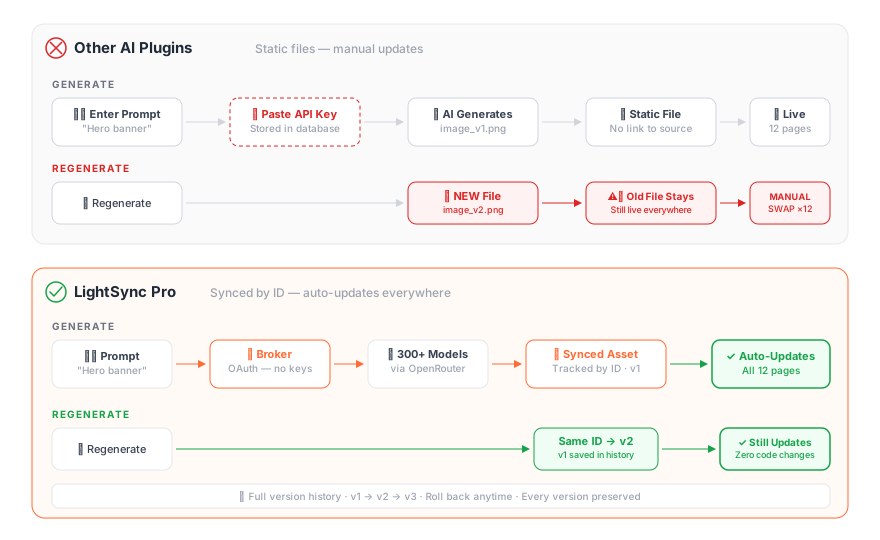
The real power: when you regenerate, the new version replaces the old one in place. Every page, post, and product using that asset updates automatically. No digging through your media library for the old file. No manually swapping images across dozens of pages. No shortcode edits or code changes.
With the standard approach, regenerating an AI image creates a second file in your media library. The old one is still live everywhere you placed it. Now you’re swapping files manually across every page — the same update cycle LightSync Pro was built to eliminate.
With versioning and in-place updates, your AI-generated content works exactly like your synced creative assets: always current, always consistent, with a complete history if you ever need to roll back.
A Different Approach to AI in WordPress
Most WordPress AI integrations follow a “bring your own key” model — you sign up with an AI provider, generate an API key, and paste it into a plugin’s settings. It works, and there are great plugins built this way.
LightSync Pro takes a different approach. Instead of storing credentials on your site, AI access flows through the same secure broker that handles your Lightroom, Figma, Canva, and Dropbox connections. You authenticate once via OAuth, and your site never holds the key.
The practical difference shows up at scale. An agency managing 20 client sites doesn’t need to distribute API keys across 20 databases — they connect once through the broker and manage access centrally. And because AI Generate is part of the same sync pipeline, generated assets get tracked by ID with version history, just like your creative files from other sources.
It’s not about better or worse — it’s a fundamentally different architecture that makes more sense when you’re already syncing creative assets to WordPress and want AI capabilities built into the same workflow.
Part of the Same Pipeline
AI Generate isn’t a separate feature bolted onto a sync plugin. It’s another source in the same pipeline that already connects your creative tools to WordPress:
Creative Sources: Adobe Lightroom · Canva · Figma · Dropbox · Shutterstock
AI Models (via OpenRouter): Claude · GPT-4 · Llama · Stable Diffusion · Gemini · Mistral · 300+ more
Destinations: WordPress (Free/Pro/Enterprise) · Shopify (Free/Pro/Enterprise) · Contentful (Enterprise) · Hubspot CMS (Enterprise)
All through one broker. One authentication per source. Zero credentials on your site.
A photographer installs LightSync Pro, connects their Lightroom account and AI Generate, and their site can pull photos from the cloud, generate optimized alt text with Claude, suggest performance improvements, and keep everything in sync — automatically.
An agency connects once and distributes that access across every client site they manage. No API keys scattered across databases. Revoke access centrally if a client leaves. Add a new site in seconds.
Who Is This For?
Photographers who sync their Lightroom portfolio to WordPress and want AI-generated alt text, captions, and SEO descriptions without a separate plugin or a separate AI subscription.
Agencies managing multiple client sites who need AI capabilities across all of them without distributing API keys to every database. Connect once through the broker, manage everything centrally.
E-commerce teams running Shopify or WooCommerce stores who need product image descriptions, visual analysis, and content optimization at scale — generated and kept in sync automatically.
Content creators who use Canva or Figma for graphics and want AI to handle the repetitive work of writing image metadata, generating social variations, or optimizing assets for web performance.
Anyone tired of the API key dance who just wants AI to work in WordPress the way OAuth works everywhere else — click, approve, done.
Frequently Asked Questions
Do I need an OpenRouter account to use AI Generate? You’ll create one during the OAuth connection flow, but you won’t need to generate or manage API keys. The consent screen is the same one-click approval you’d see connecting a Google or Dropbox account.
Is AI Generate free? Yes — AI Generate is available in the free version of LightSync Pro. OpenRouter offers free-tier models, and paid models are billed through your OpenRouter account at their standard rates. LightSync Pro doesn’t add any markup.
What AI models can I use? Anything available through OpenRouter — currently over 300 models including Claude (Anthropic), GPT-4 and GPT-4o (OpenAI), Llama (Meta), Stable Diffusion, Gemini (Google), Mistral, and more. New models are available as soon as OpenRouter adds them.
How does versioning work? Every AI-generated asset is tracked by a unique ID in your WordPress media library. When you regenerate, the new version replaces the old one at the same ID — so every page, post, or product using that asset updates automatically. Previous versions are saved in the version history, and you can roll back at any time.
Can I use AI Generate alongside my Lightroom or Figma sync? That’s exactly how it’s designed. AI Generate is another source in the same pipeline. You might sync photos from Lightroom, design assets from Figma, and use AI Generate for featured images or SEO metadata — all flowing through the same broker, all tracked with version history.
What happens if my site is compromised? Since no API keys or OAuth tokens are stored on your WordPress site, there are no AI credentials to steal. The broker holds all authentication. You can also revoke site access centrally from your LightSync Pro account without touching the compromised site.
Try It Free
AI Generate is available in the free version of LightSync Pro. Install from WordPress.org, connect to OpenRouter with one click, and start generating.
No API keys. No credentials on your site. Just connect and create.
LightSync Pro syncs creative assets from Adobe Lightroom, Canva, Figma, Dropbox, and Shutterstock to WordPress and Shopify. AI Generate powered by OpenRouter provides access to 300+ AI models through LightSync Pro’s secure broker architecture. Learn more at lightsyncpro.com.